

How to Post to Xiaohongshu, Douyin and X at Once with Freepost
Connect Xiaohongshu, Douyin and X in Freepost. Draft with AI, check platform limits, then publish or schedule.

By
Freepost team
To post to Xiaohongshu (RedNote), Douyin and X at the same time with Freepost: connect the three accounts, describe the post in one sentence to the AI (or write one draft yourself), fix whatever each platform's preview flags, then publish or schedule. RedNote and Douyin connect by scanning their own app's QR code; X signs in on its own login page, and Freepost never stores your password. Everything runs in the browser — there is nothing to install.
A note on maturity: RedNote publishing and X text posts have been verified on live accounts. Douyin, and X posts with images or video, were opened recently and are still being verified, so check the result in each app after you publish — the last section shows how.
Before you start
- A Freepost account. Sign up free, no card needed. The free plan connects 5 accounts and allows 10 posts a day.
- Your three accounts, plus the RedNote and Douyin apps on your phone for scanning. The Douyin account must already have passed Douyin's real-name verification.
- Media. RedNote and Douyin both require an image or a video. One vertical video works on all three platforms and is the simplest option.
Step 1: Connect RedNote, Douyin and X
In Freepost, open Accounts and click Add account. The dialog walks through Platform, Environment, Network, Sign in and Ready.
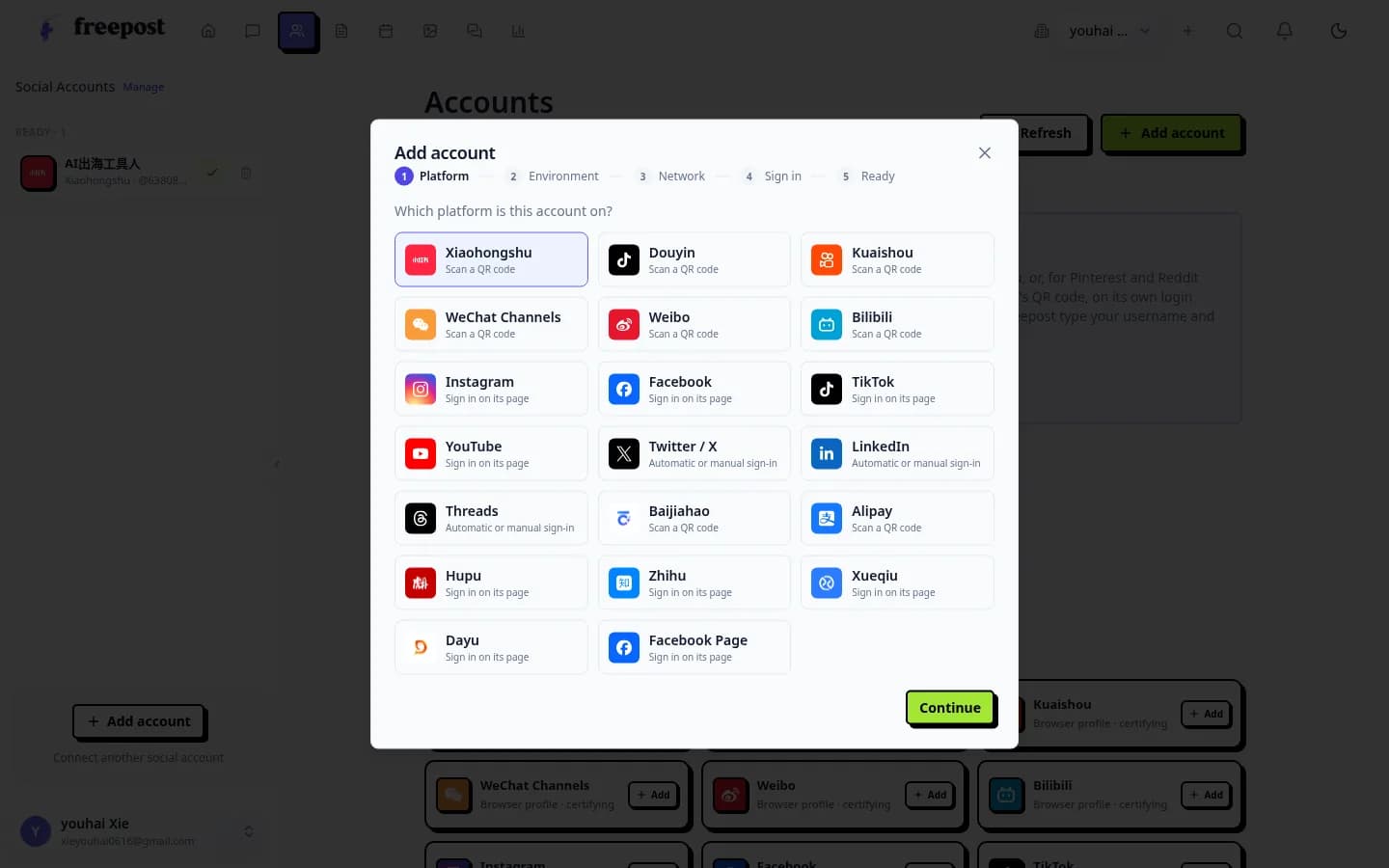
Freepost's platform picker: Chinese platforms such as Xiaohongshu and Douyin say "Scan a QR code"; X and other global platforms sign in on their own page.
- Xiaohongshu: choose Xiaohongshu and scan the code with the RedNote app. The code comes from that account's own browser session and expires after about 15 minutes.
- Douyin: choose Douyin and scan with the Douyin app.
- X: choose Twitter / X and sign in on X's own login page, or let Freepost type your username and password once. The password is not stored.
Each account keeps its session in its own browser profile. Every connected account uses one slot on your plan; see pricing. Channel guides: Xiaohongshu, Douyin, X.
Step 2: Describe it in one sentence, or write it yourself
With AI: in the AI chat, say what you want in one sentence, for example:
Write a post about our new pour-over coffee kit for RedNote, Douyin and X — a first-person review tone in Chinese for RedNote, English for X.
It drafts a separate version for each platform and holds them as drafts for your review. Nothing goes out automatically. You can also give it a topic and a rhythm, and it will draft for each platform on schedule, again waiting for approval.
By hand: create a post, add a title and text, upload media and pick the accounts.
Either way, give each platform its own version: a first-person note for RedNote, a punchy title to go with the Douyin video, and a post written for a global audience on X. Our guide to adapting one post for each network covers what to change, and the AI copy checklist for RedNote helps the Chinese version sound native.
Step 3: Fix what each preview flags
Once accounts are selected, each platform gets its own preview, and Freepost flags anything that platform would reject.
Swipe to see more
| Platform | Body | Title | Media |
|---|---|---|---|
| Xiaohongshu | Up to 1,000 characters | Up to 20 characters | Required, up to 18 images or 1 video |
| Douyin | Up to 1,000 characters | Up to 30 characters | Required, images or video |
| X | 280, weighted (Chinese characters count double) | None | Optional, up to 4 images or 1 video |
Common catches:
- Six images are fine on RedNote but X takes four, so choose a subset for X or post the video instead.
- A RedNote title over 20 characters is blocked; Douyin allows 30.
- Keep WeChat IDs, links and QR codes out of the RedNote note — its community rules treat them as traffic diversion.
Step 4: Publish now or schedule
- Publish now once all three previews are clear.
- Schedule by picking a time on the calendar. At that time Freepost publishes from each account's browser profile, retries failures automatically and tells you what needs attention. The free plan holds up to 5 queued scheduled posts, Starter 10 and Pro 20.
The calendar has month, week and day views in your time zone. To compare this with RedNote's built-in scheduling, see how to schedule Xiaohongshu posts.
Step 5: Check the results
- In Freepost's publishing history, each platform shows published, failed or result unknown.
- Open RedNote, Douyin and X and confirm the post is there. RedNote and Douyin posts also go through platform review.
- If a result is unknown, check the platform before you publish again, so you don't post twice.
- If a session expires, Freepost asks you to scan again.
FAQ
Can I post to TikTok and Douyin together?
Yes. They are separate platforms with separate accounts; connect both and select both.
Does this work from outside China?
Yes. Freepost is web-based and QR sign-in works wherever you are, but each platform's own rules and verification still apply. Douyin needs Chinese real-name verification — see Douyin vs Xiaohongshu vs WeChat Channels.
What other platforms can I add?
Freepost connects 22 platforms, including WeChat Channels, Weibo, Kuaishou, Bilibili, Zhihu, Instagram, LinkedIn, TikTok and YouTube. See all channels.
Will the AI publish without asking me?
No. AI drafts wait in review until you approve them.
Is the free plan enough?
For testing three platforms, yes: 5 accounts, 10 posts a day, 5 queued scheduled posts and 10 AI chats a day. Upgrade when you need more — see pricing and features.